The Ultimate Ecommerce SEO Checklist for 2026

Most online shops don’t have a product problem. They have a “nobody can find the product” problem. This checklist covers 29 things worth checking, from setting up Search Console to how AI search is changing the way people find products.
The Ecommerce world is highly competitive, but online stores still have an immense opportunity to grow into successful brands. With online shopping tripling in the UK between 2015 and 2025, more than 30% of purchases now occur online.
Whether you sell a collection of products or have a niche store, one of the best ways to get found and sell more items is by developing an SEO strategy.
Getting Started With Ecommerce SEO
Before you even think about creating a strategy and performing keyword research, set up your accounts and make sure you have the right tools. Think of this stage as laying the foundations for an effective strategy.
1: Add Your Site to Google Search Console
Google Search Console is non-negotiable for Ecommerce sites. Plus, it’s free, so you won’t need to worry about paying for an account. The tool lets you track your search performance and identify indexing issues limiting your website’s ranking potential.
All you need to do is go to Google Search Console, set up an account, and add your website. The tool will then guide you through the verification process, which confirms that you own the website.
2: Submit Your Sitemap
Sitemaps tell search engines about your website’s pages and help them find the ones you want indexed. Most website builders generate an automatic sitemap, and you can usually find it by typing {your domain}/sitemap.xml into the browser.
If yours doesn’t, a free tool like XML Sitemaps Generator can create one.
Separately, your robots.txt file tells search engine bots which areas of your site not to crawl. Many ecommerce stores block basket, checkout and account pages, as these have no value in search results. Blocking crawling doesn’t remove a page from the index, though. For that, use a noindex tag.
Once you have the sitemap, follow the instructions to submit it to Google Search Console.
3: Set Up Your Bing Webmaster Account
Google is the world’s largest search engine, with around 90% of the global market share – but that doesn’t mean you should ignore other search engines.
According to Backlinko, 100 million people use Bing each day. If you only focus on Google, you could miss traffic. Bing Webmaster Tools is also free to use and works similarly to Google Search Console. You can import your site straight from Search Console, which saves repeating the verification step.
Head to the login page, add your account, and follow the instructions.
4: Confirm Your Website’s Indexed
Your website won’t appear in search results unless it’s successfully indexed. You can check whether it’s indexed using Google Search Console and Bing Webmaster Tools.
Remember that search engines can take time to index your pages, and new pages can take over a week to appear in the search results. If you want a quick check of which pages appear on searches, type this into Google’s search bar: site:yourdomain.com.
If Google Search Console and Bing have problems indexing certain pages, they’ll notify you, and you can then fix them:
5: Set Up Your Google Analytics Account
While Google Search Console analyses your website’s search performance, Google Analytics provides vital insights as to how visitors interact with your website.
It shows you how they found your website, whether they engaged with your content, and how many visits resulted in conversions. By analysing buyer journeys, you can identify where people drop out of the buying process.
You’ll need to set up a Google Analytics 4 account, then add your website as a property. The platform will ask you to add a Google tag to your website, which you can do through your ecommerce platform’s settings or Google Tag Manager. Make sure ecommerce events (product views, add to basket, purchases) are tracked too, or you’ll see visits but not sales.
6: Run a Complete Ecommerce Website Audit
Whether you have a new or established Ecommerce brand, it’s essential to evaluate how the site works and whether there are any issues.
Investing in a professional Ecommerce SEO audit is beneficial, as experts know which problems to look for and will offer actionable steps to overcome them. Alternatively, you can use specialist SEO tools to run an audit.
Once the analysis is complete, you’ll receive an Ecommerce SEO audit checklist and can action any recommendations.
7: Choose Your Ecommerce SEO Tools
SEO tools are useful investments, as they can help you find problems and opportunities you’d otherwise miss.
There are so many tools available at different price points, and it’s common for newer businesses to go on a spending spree. A tool you pay for every month and open twice a year is a subscription, not a strategy.
Start with the free tools, and add paid ones when you know what you need them for. Here are some top SEO tools for ecommerce brands:
| Tool | Purpose | Top Features | Pricing |
| SEMRush | All in one SEO platform. | Website Audits, Keyword Research, Backlink Analysis, Competitor Monitoring. | ££ to £££ |
| Ahrefs | All in one SEO platform. | Backlink Research, Keyword Tool, Competitor Analysis, Website Audits. | ££ to £££ |
| Google Keyword Planner | Keyword research tool. | Find Relevant Keywords, Track Volume, Competition, and CPC. | Free |
| Screaming Frog | Technical SEO tool. | Run Website Audits, Check for Indexing, On-Page and Technical SEO Issues. | Free for websites with up to 500 URLs, then £199 a year. |
| Surfer SEO | Content optimisation tool. | Create Optimised Blog Posts and Product Descriptions. | ££ to £££ |
Remember, many Ecommerce platforms like Shopify and WooCommerce have built-in SEO features.
Ecommerce Technical SEO Checklist
Technical SEO is the plumbing of your shop: nobody notices it until something leaks. It’s one of the biggest issues that ecommerce sites face, and solid technical SEO matters for turning visitors into buyers. Unfortunately, it’s also one of the most complex areas to navigate.
It’s one of the biggest issues that Ecommerce sites face, and flawless technical SEO is vital for turning visitors into buyers. Unfortunately, it’s also one of the most complex strategies to navigate.
Here are some key technical SEO tips for your Ecommerce store.
8: Test for Core Web Vitals
Core Web Vitals are Google’s measures of loading speed, visual stability and responsiveness. They’re one of many ranking signals, and they also affect whether shoppers stick around.
Google’s Core Web Vitals are standards that all websites should aim for:
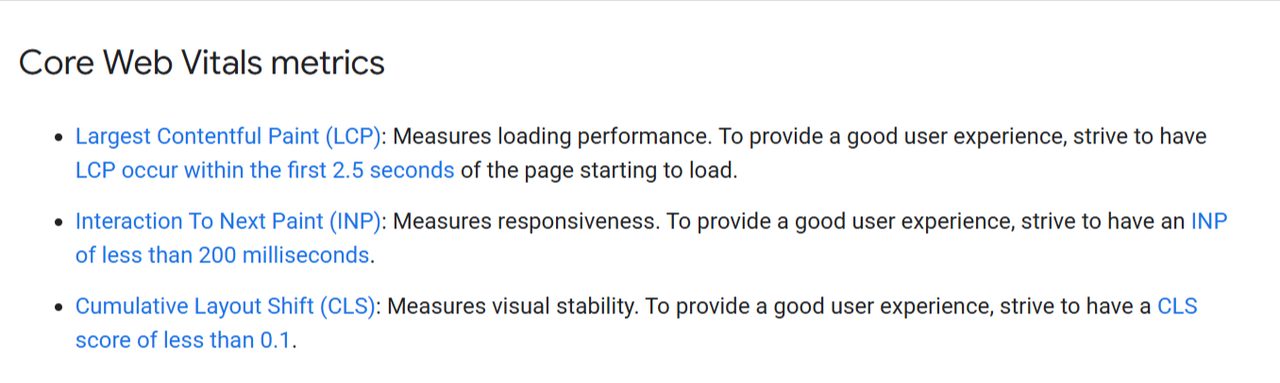
You can check your Core Web Vitals in Google Search Console’s reports. Common fixes include compressing product images, removing unused apps and scripts, and using a reputable ecommerce website hosting platform.
9: Check for Mobile Responsiveness
According to InternetRetailing, 90% of consumers in the UK use their mobile devices to shop online. You lose customers if your website doesn’t work well across all devices.
Using a professional website design service or a platform offering mobile-responsive templates should mean the site displays correctly across all devices. Test it on real phones anyway.
10: Refine Your Internal Linking
We often focus on building external links as they enhance a website’s online authority and reputation. Internal links are just as important because they help users navigate your website and help search engines find and understand your pages.
You should focus on linking relevant pages to each other to build topical authority. This includes products and blog pages.
For example, an online football kit store might use the following internal linking structure:
Men’s Football Shirts → Manchester United Shirts → Classic Manchester United Shirts → 1999 Manchester United Shirts
11: Website Navigation Menu
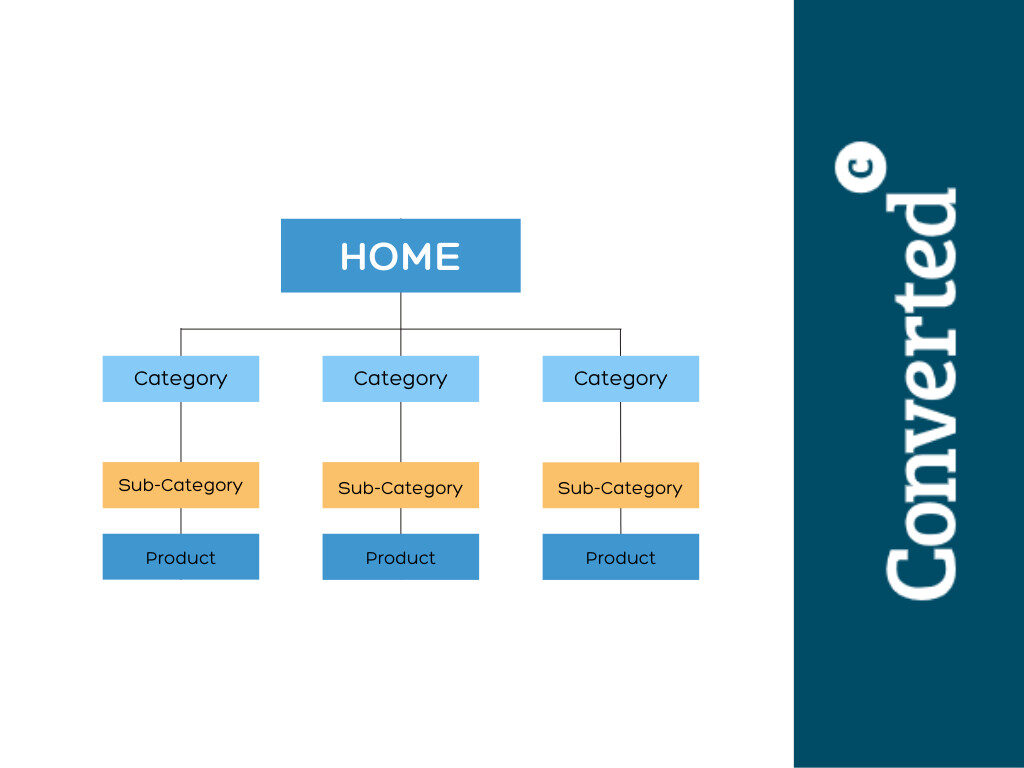
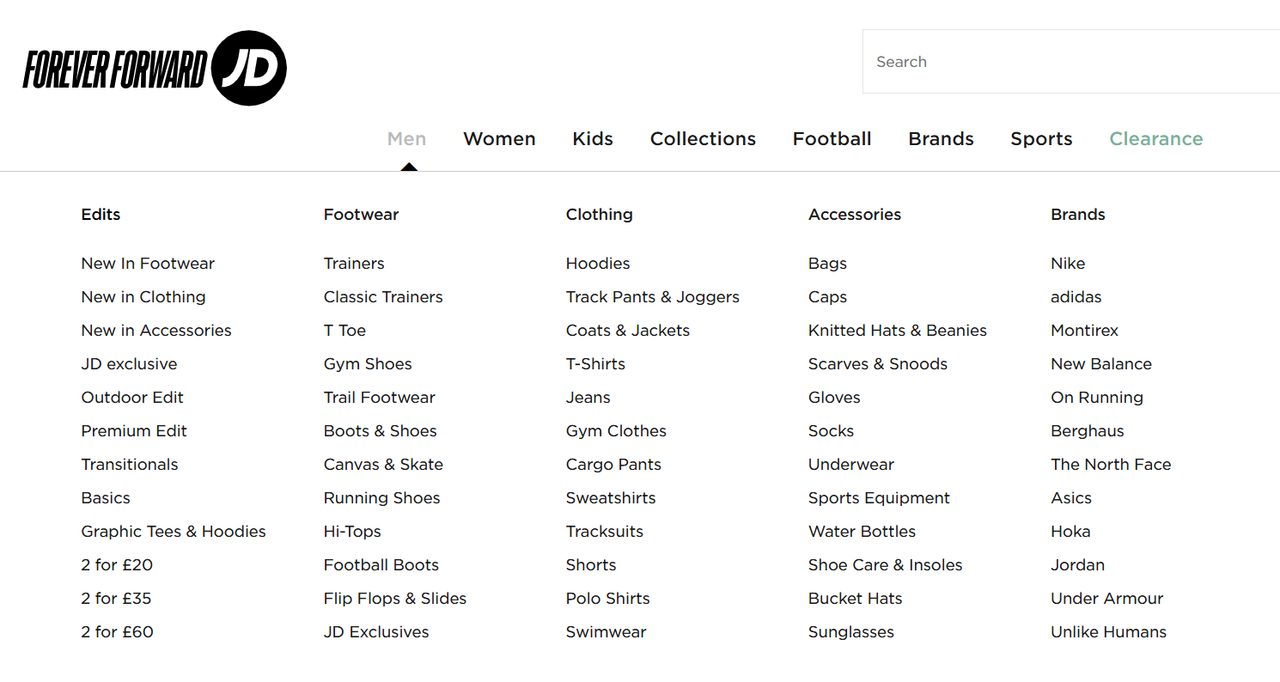
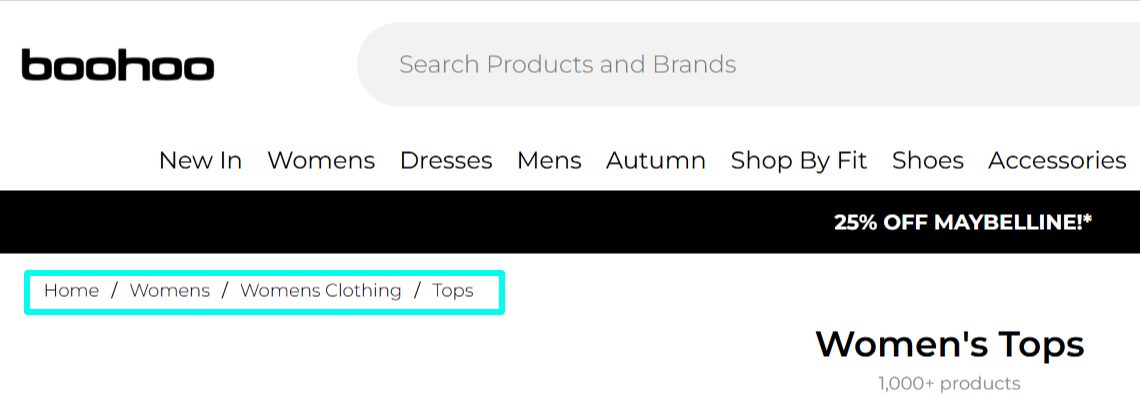
Website navigation menus are important for ecommerce stores, as they let visitors find the content and products they’re looking for and reduce bounce rates. The menu also tells search engine crawlers which pages are most important.
A proper website navigation menu will link the top-level pages to categories and sub-categories, as per this example:
12: Test Website Speed
How often have you been in a physical store and abandoned your purchase due to long queues and limited checkouts? Well, it’s the same with your website’s loading speed.
A slow-loading website is frustrating for customers and can cause a surge in cart abandonment and bounce rates.
Research published by Shopify reveals that loading speeds of 3 seconds have average bounce rates of 8%, but they increase to 24% if loading times drop to 4 seconds.
Use PageSpeed Insights
The best way to test your website’s loading times is by using PageSpeed Insights, a free tool that offers insights into how to boost your website’s speed. The diagnostic report details key metrics, enabling you to improve loading times and give users a better experience.
Keyword Research
While keyword research is no longer the be-all and end-all, it’s still one of the cornerstones of a successful ecommerce SEO strategy. Shoppers use search engines like Google and Bing when searching for a particular product.
Your website is far more likely to appear in these searches if you use the right keywords and understand search intent.
13: Find the Right Keywords
The keywords you choose significantly affect your website’s visibility, but it’s not just a case of choosing high-volume terms. If your website has limited authority and backlinks, it won’t be able to compete with larger sites.
The first step you should take when finding Ecommerce keywords is using an SEO tool, including paid options like SEMRush and Ahrefs, or Google Keyword Planner – a free tool.
Volume
Search volume tells you how many people search for your chosen term monthly, but short-tail keywords often have significant competition.
Wherever possible, look for long-tail keywords (longer, more specific searches), as they still bring in visibility, but are easier for less established ecommerce websites to rank for.
Difficulty
A keyword’s difficulty score gives you an idea about how competitive it is. Most tools score difficulty from 0 to 100, with 100 being the most challenging to rank for.
For example, a popular term like “cat food” has a medium difficulty rating, but adding long-tail phrases or brand names can significantly reduce the competition levels.
Relevance
As an e-commerce store, you’ll also want to check for keyword relevance. If you’re an online pet store that sells products for cats and dogs, there’s no point adding keywords for rabbit and guinea pig food.
14: Use the SERPS
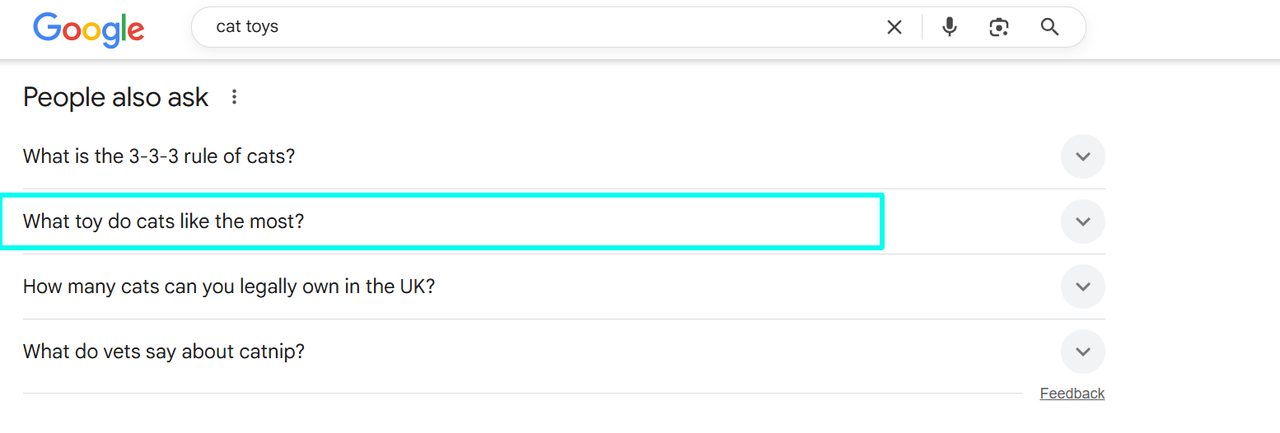
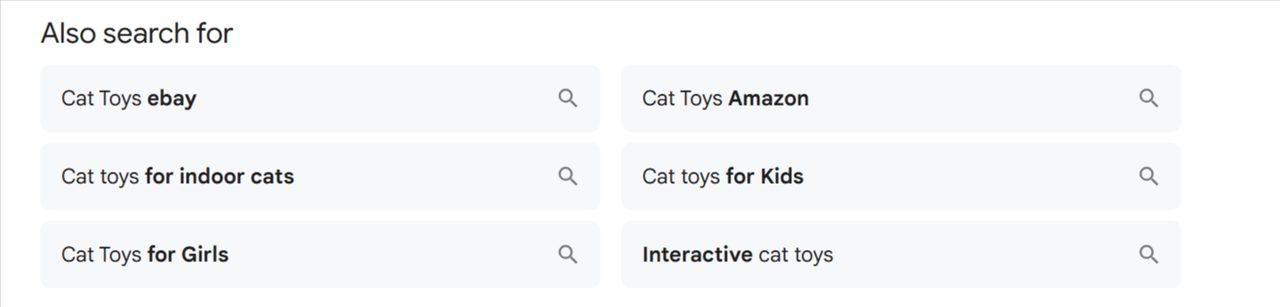
A common mistake is focusing solely on keyword research tools but not factoring in the search results themselves (the SERPs). Google is a useful source of potential keywords, with the People Also Ask and People Also Search For sections providing inspiration.
As you can see from these examples, a search for cat toys provides some useful keyword ideas to add to your ecommerce SEO strategy.
15: Don’t Forget Search Intent
Having a list of keywords is a good first step, but your job isn’t done yet. Google’s ranking systems are built to reward pages that match what the searcher actually wants, so intent matters as much as the keyword itself.
If your page doesn’t match the intent behind a search, it’s unlikely to rank well for it, and the visitors who do arrive won’t stay. There are four types of search intent to be aware of:
- Informational: When people are searching for answers to a question – e.g.“What’s the difference between the iPad Pro and iPad Air?”
- Navigational: The searcher is looking for a specific brand or website page – e.g. “Apple iPad Warranty Policy.”
- Commercial: Users want to compare products or services before making a decision – e.g “iPad Pro vs Microsoft Surface Pro”.
- Transactional: The searcher is ready to purchase – e.g. “buy iPad Air 256GB”.
On-Page SEO Checklist for Ecommerce Websites
On-page SEO is optimising your website pages to improve organic visibility. However, it can also encourage people to click on your website and turn visitors into buyers. Here’s how to simplify on-page SEO and get the most from it.
16: Follow the Correct Heading Structure
Following the correct heading structure lets the search engine crawlers identify and organise your content properly. Each product page or blog post should have one H1 tag, which serves as the page’s title.
You can then split different sections into H2s and use H3s to expand on the section.
17: Use Keywords in Your URLs
URLs (Uniform Resource Locators) tell search engines about your page. You should always add your main keyword to the URL when possible, and avoid using too many words.
When you use Ecommerce platforms, they’ll often set product URLs to something like index.php with some numbers after. However, you can change these URLs to detail the product, so instead of the standard index.php content, it would be domain.com/nike-trainers.
If a product page is already live and ranking, set up a 301 redirect when you change its URL.
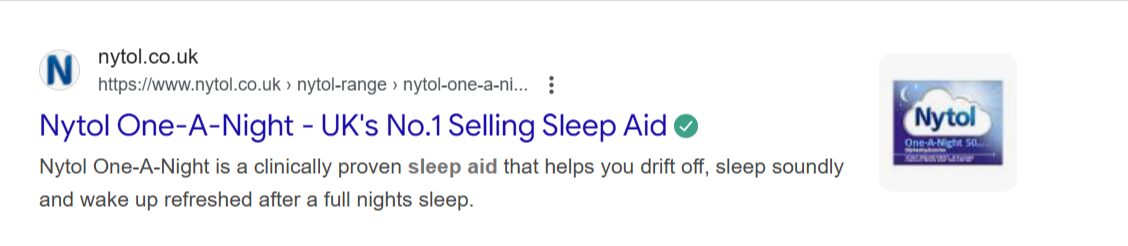
18: Create Title Tags
Title tags require a balance of optimisation and compelling content. After all, your job here is to help the search engines understand your website pages and give users a reason to click on them.
It’s always a good idea to include your main keyword at the beginning of the title tag, and keep it to under 60 characters.
19: Get Creative With Your Meta Descriptions
Meta descriptions are your opportunity to get creative, as you have more space to encourage users to click. Try to add some target keywords, but avoid stuffing.
Your main goal here is to create a compelling description, but make sure the description doesn’t exceed 155 characters.
Which of These Would You Click On?
- Meta Description 1: Buy walking boots UK. We have the best walking boots in the UK. Our walking boots are great walking boots for walking.
- Meta Description 2: Waterproof walking boots for men and women, from lightweight trail shoes to winter boots. Free UK delivery and returns. Find your next pair.
Probably meta description two, right? Think of meta descriptions as short-form copy, and you’ll create descriptions that stand out on the SERPs and attract clicks. Just make sure every claim in them, from “free delivery” to “top-rated”, is one you can back up.
20: Implement Schema Markup
Schema markup (structured data) lets search engines identify and understand your content. Ecommerce stores often implement structured data to showcase prices, stock levels and average reviews, which can increase click-through rates.
Google’s Structured Data Markup Helper is a simple way to implement structured data, but a website developer can also help you. Many ecommerce platforms add product markup automatically. Either way, test it with Google’s Rich Results Test.
21: Add Alt Text to Images
Photos of your products can appear in image searches, but the best way to increase their visibility is by using image alt text. Aside from giving each file a relevant name, it’s also important to provide descriptive text explaining the image.
For example, an image of pink Nike Air Max trainers should have alt text like “pink Nike Air Max trainers on a blue background”. If you can add a keyword to your alt text, then it’s a good idea, but providing an accurate description is your main priority here.
Off-Page SEO Checklist for Ecommerce Reputation and Authority
Off-page SEO is the difference between people recognising and trusting your ecommerce store, or it going unnoticed. When high authority domains link to your website, it sends trust signals to Google, which can help your rankings.
Unfortunately, there’s no quick way to build links, and finding high authority opportunities can seem like a never-ending struggle. Following these best practices can help you build a strong link profile and increase your site’s authority.
22: Create Great Content
We’ll cover this in more detail in the next section, but the better your content is, the more likely other websites are to link to it. Aim to provide informative content that clearly demonstrates your knowledge on a topic.
How-to posts, listicles, and statistics-focused content are good ways to encourage backlinks. Creating product demonstration videos, infographics, and user manuals is also a good idea.
23: Monitor Your Competitors
SEO tools like Ahrefs and SEMRush let you spy on your competitors and find out where their links are coming from. By assessing the competition’s backlink profile, you can isolate promising opportunities.
For example, if a competitor is listed in specific directories you haven’t heard of, you can add your brand to these websites, as long as they’re genuine, relevant directories rather than link farms. It’s also a good opportunity to understand why other websites link to the competition and create content offering more value.
24: Digital PR
Journalists need to find reputable sources for stories, which gives brands a good opportunity to secure some backlinks and set themselves apart as an authority. The best places to find opportunities include Featured and Qwoted.
Content Marketing Strategy Checklist
Every website – no matter its niche – needs a dedicated content strategy. Ecommerce brands that focus only on product pages miss out on building lasting relationships with their target audience and turning them into loyal customers.
Keyword research will help you to build a content strategy, but you’ll also need to understand your audience’s behaviours, intent, and favourite platforms to discover new brands.
For example, while many people use Google to search for products, YouTube, Reddit, and social media platforms are also popular resources. YouTube is often described as the second largest search engine after Google.
25: Create Different Types of Content
Ecommerce stores can create multiple types of content to cater for all preferences. While category and product landing pages are must-haves, blog posts that compare products or provide useful information can appeal to top-of-funnel audiences (people who are still researching and not yet ready to buy).
Video content is becoming increasingly popular, and repurposing your blog posts into videos can give them a wider reach.
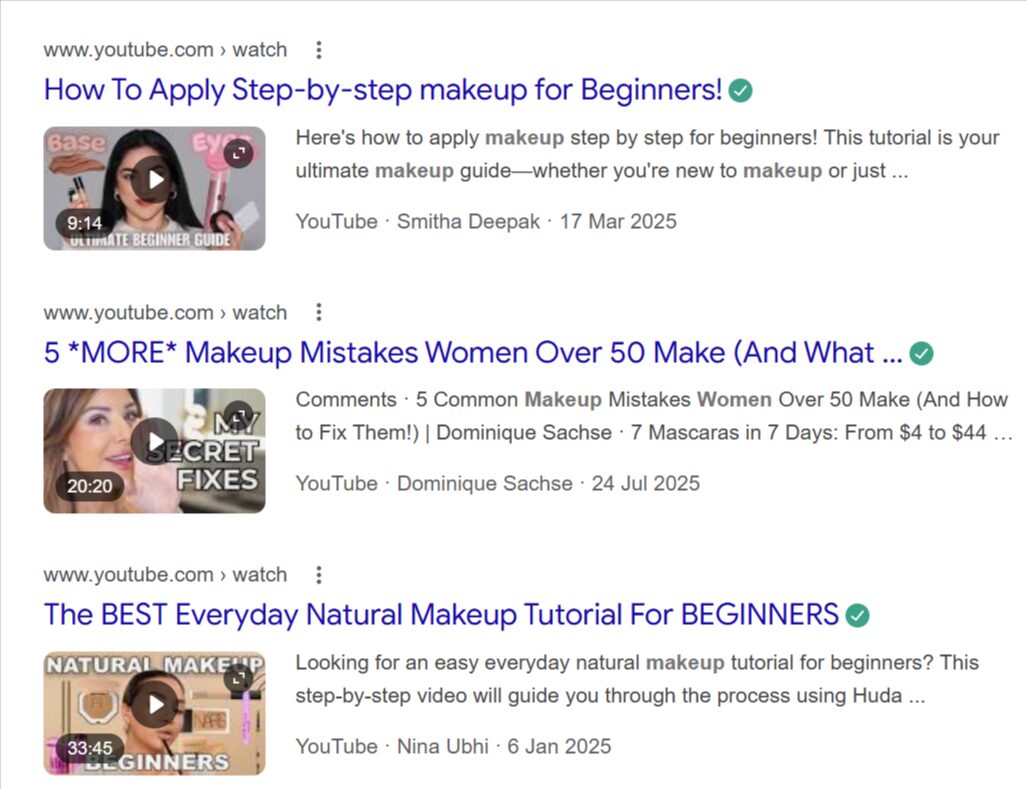
Once you know where your users look for products and the type of content they prefer, you can implement a strategy that puts you in front of them.
26: Use Collection Pages
A common challenge all Ecommerce stores face is achieving high rankings for a particular product. In most cases, stores like Amazon, eBay, and Etsy will dominate the SERPs, but you also have to factor in larger brands with a strong reputation.
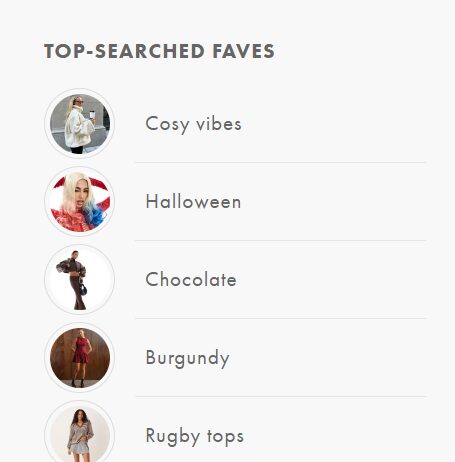
Collection pages give you another way in. They target broader, browsing-style searches where a single product page wouldn’t rank, and put your products in front of people who haven’t decided what to buy yet.
There are many ways to do this, including creating bestseller, seasonal, and occasion category pages, like this example from ASOS:
27: Remove Duplicate Content
Duplicate content occurs when two or more URLs have the same or very similar information, which makes it hard for search engines to decide which page to index and rank.
Ecommerce businesses should always write unique product descriptions instead of taking them from the manufacturer’s website. In some cases, filtered or sorted versions of a page create duplicate content. A canonical tag tells Google which version is the main one, and a noindex tag keeps a page out of search results altogether.
Local Ecommerce SEO
Local SEO matters most for ecommerce businesses with a physical shop or showroom, but it can also help online-only stores show up for searches that include a place.
If someone’s searching for refurbished laptops in their area, and you offer UK-wide delivery, it’s worth making that clear on your site, for example on your delivery information pages.
28: Get A Google Business Profile (If You’re Eligible)
Google Business Profile is for businesses that meet customers in person, either at premises customers can visit or by travelling to them. If you have a shop, showroom or collection point, set one up: you can collect reviews and help nearby customers find you. Online-only stores aren’t eligible under Google’s guidelines.
29: Create Location-Focused Landing Pages
Ecommerce stores with physical locations in multiple places should have dedicated pages for each. These pages should contain the store’s address and contact information, plus opening hours and anything specific to that location.
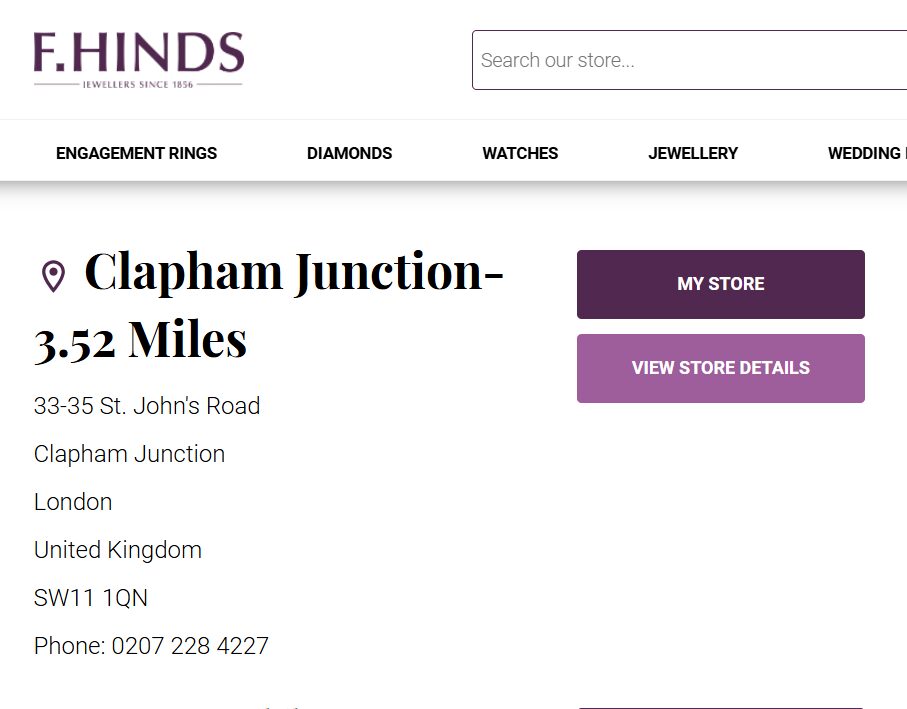
If you only operate online, be careful. Location pages that are near-identical apart from the town name count as doorway pages under Google’s spam policies. Only create them if each one has something genuinely useful and specific to say, such as local delivery times or a local stockist.
Key Takeaways For Creating an Effective Ecommerce SEO Strategy
Optimise, Optimise…and Optimise Again
Every product you sell should have a description containing suitable keywords that align with search intent. Remember to create high-quality images that include relevant file names and alt descriptions.
The website pages and images should all align with Core Web Vitals, offering fast loading times and responsive across multiple devices.
Get to Grips With AI
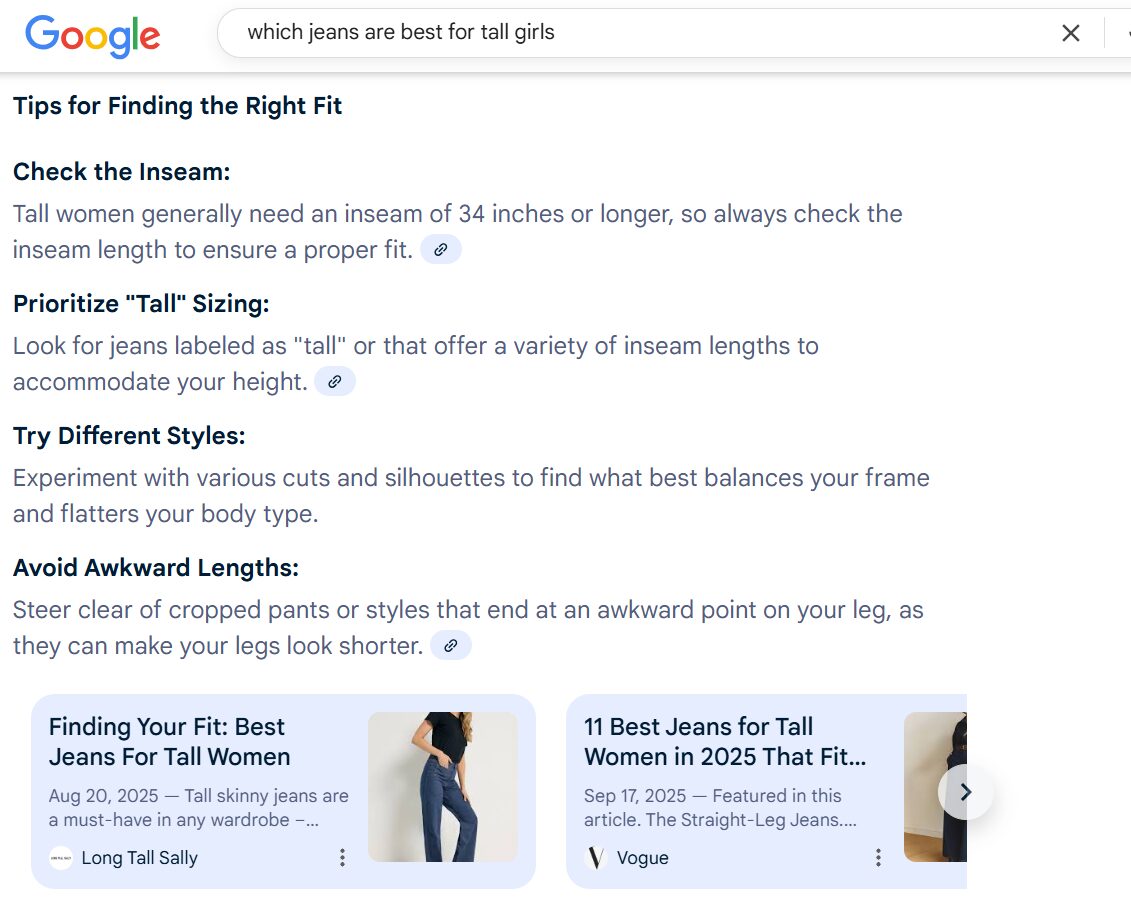
Zero-click searches are becoming more common, as Google’s AI Overviews and AI Mode now provide instant information. However, AI generates these answers based on other sources, and clear, accurate, well-structured content gives you a better chance of being one of them.
Implementing structured data markup and assessing which websites appear in AI Overviews can help you understand what it takes to appear in them.
Ask For Reviews
A massive 93% of customers state that online reviews factor into their buying decisions (BusinessDasher). A lack of reviews or negative customer feedback can significantly decrease your chances of attracting new customers and making sales.
Ask every customer for a review, not just the ones you think are happy, and don’t offer anything in exchange. Google’s policies and UK consumer law both restrict incentivised and selectively gathered reviews. Always respond to negative feedback, because it shows customers that you care about their experience.
Test and Improve
Use tools like Google Search Console to test your website’s online visibility and Google Analytics to evaluate how users behave on your website. Heatmaps can also highlight where customers go on your website and pinpoint issues relating to cart abandonment.
Tools like Hotjar can be beneficial for evaluating user behaviour, and you can then make changes to see whether they result in more sales.
What to Do Next
Work through the setup items (1-7) first, since everything else depends on them. Then fix technical problems before adding content: a fast, indexable site makes every other improvement count for more. Revisit the checklist every few months, because product ranges, platforms and Google all change.
The process of optimisation is ongoing and requires an extensive time investment. For this reason, many brands choose to work with an experienced Ecommerce SEO agency.
If you’d like to boost your online visibility and turn potential buyers into loyal customers, please contact Converted today for a free quote.